

User Manual
Read this documentation before using Mango Power Smart Gateway Lite. Improper use may lead to serious personal injury, product damage, or significant property loss. Electrical ratings from the datasheet are in Specifications.
Always refer to the most up-to-date documentation at mangopower.com/support/download. That version takes precedence over previous or alternative versions. By using this product, you agree to the terms, conditions, and safety protocols in the documentation. Mango Power is not liable for damages or losses from improper use or failure to follow the instructions. Subject to applicable laws, Mango Power reserves the right to the final interpretation of this document and related product materials.
Safety
Section titled “Safety”Mounting and installation to the power grid must be performed by a qualified electrician only.
- To prevent electrocution, ensure there is no voltage at the device terminals before changing connections.
- Use the device only with power grids and appliances that comply with all applicable local regulations. A short circuit in the power grid or connected appliances may permanently damage the device.
- Do not connect appliances that exceed the specified maximum load.
- Connect the device strictly as shown in these instructions. Alternative installation methods could lead to equipment damage and/or personal injury.
- Do not install the device where it may be exposed to moisture or get wet. Indoor use only.
- Plug in or unplug the LAN cable only when the device is powered off. Ensure the LAN cable does not have metallic parts in areas touched by the user during handling.
- Do not allow children to play with the buttons or switches connected to the device. Keep all remote control devices for Mango Power products out of the reach of children.
- Only use current transformers (CTs) that are fully compliant with local regulations and standards for this device.
- Connect using solid single-core cables with insulation heat resistance of no less than PVC T 105°C (221°F).
- Protection provided by the device may be compromised if it is used in a manner not specified by the manufacturer.
Dimensions and connection
Section titled “Dimensions and connection”Dimensions (W / H / D): 125.6 × 97.6 × 28.6 mm.
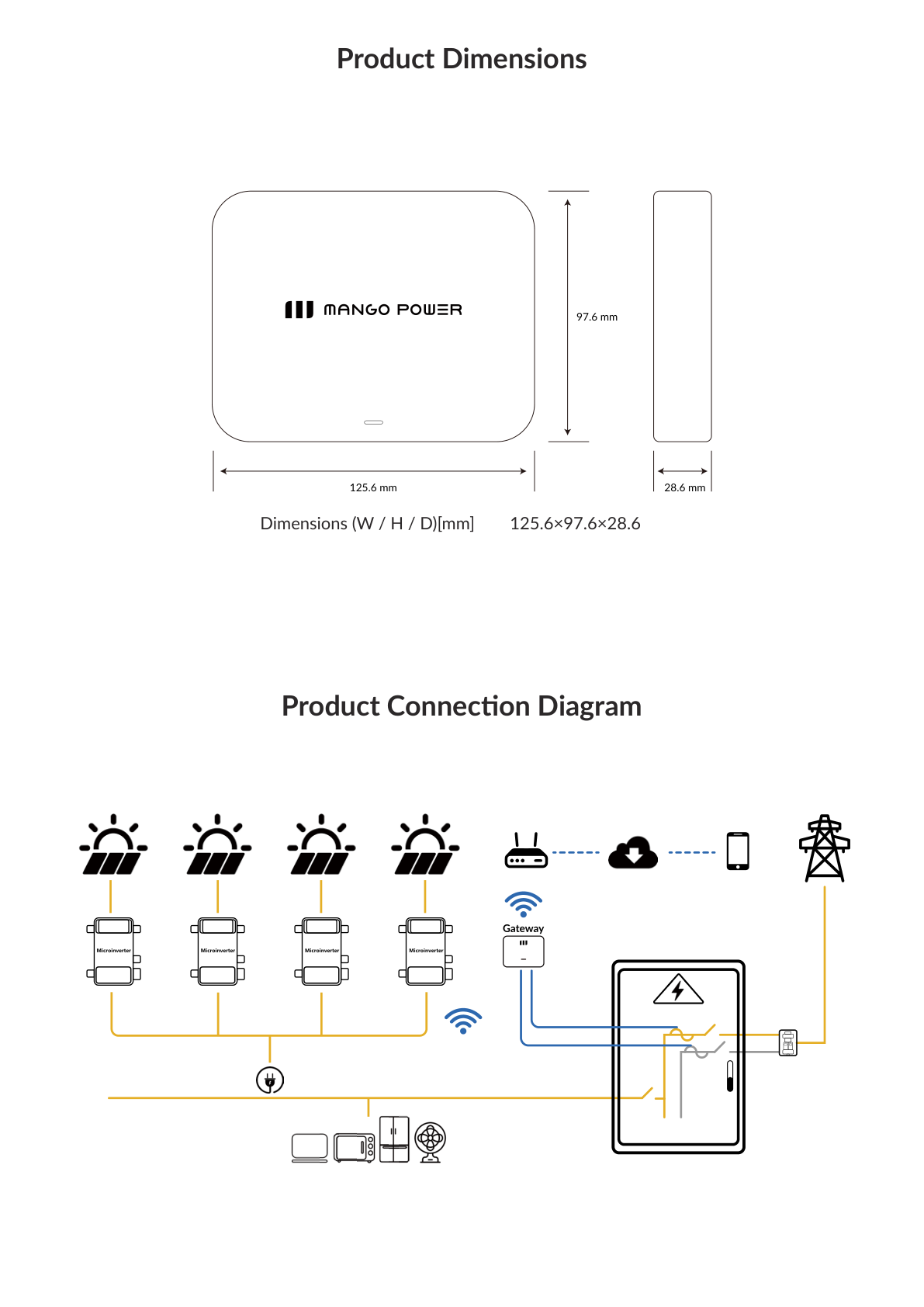
The gateway sits at the main electrical panel. Microinverters on the PV array feed AC into the panel. The gateway samples L1 and L2, communicates with the microinverters over wireless, and reports through the home router to the cloud and the Mango Power app.
Installation
Section titled “Installation”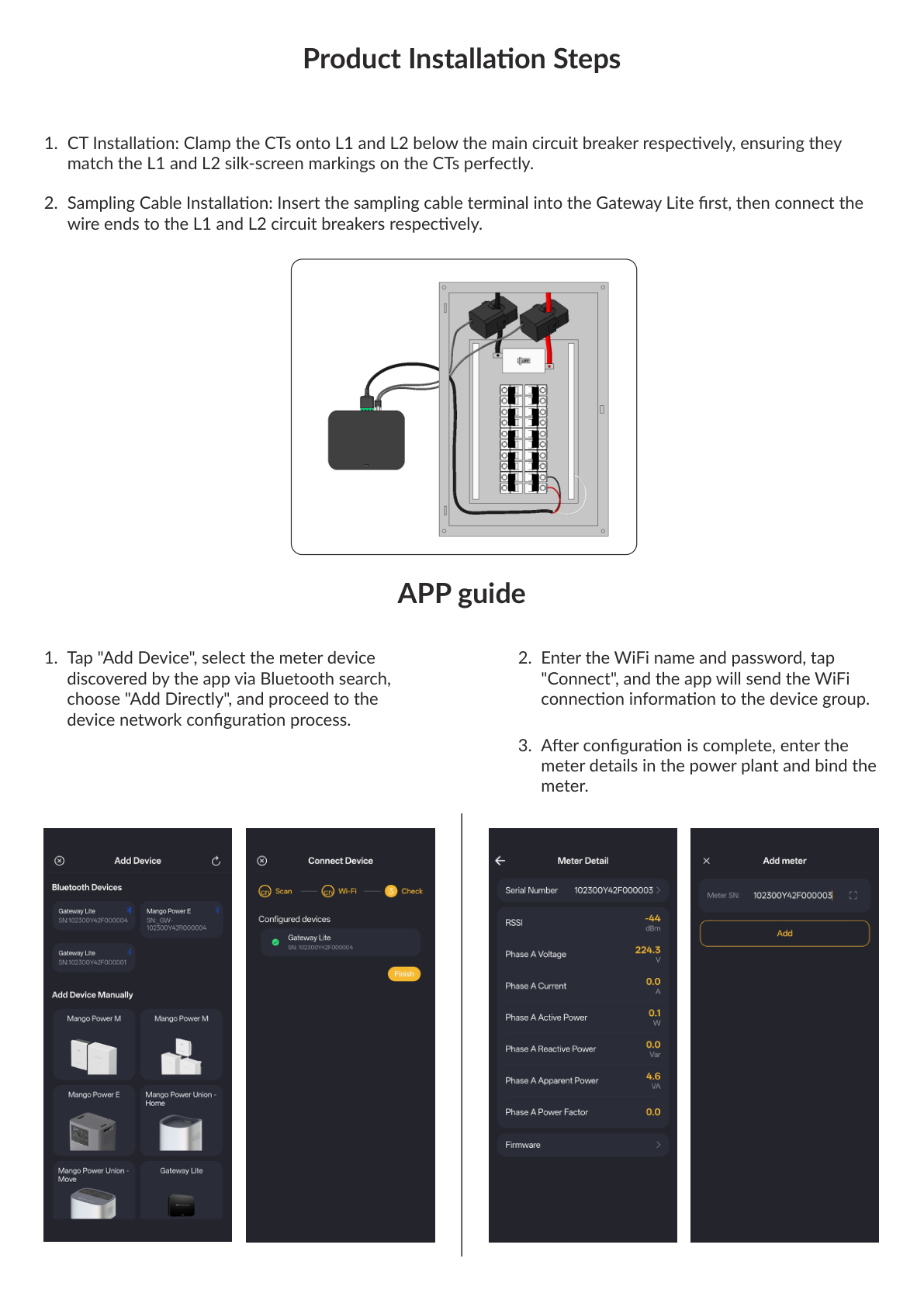
- CT installation — Clamp the CTs onto L1 and L2 below the main circuit breaker respectively, matching the L1 and L2 silk-screen markings on the CTs.
- Sampling cable installation — Insert the sampling cable terminal into the Gateway Lite first, then connect the wire ends to the L1 and L2 circuit breakers respectively.
- Tap “Add Device”, select the meter device discovered by the app via Bluetooth search, choose “Add Directly”, and proceed to network configuration.
- Enter the Wi-Fi name and password, tap “Connect”. The app sends the Wi-Fi connection information to the device group.
- After configuration is complete, enter the meter details in the power plant and bind the meter.
LED indicator
Section titled “LED indicator”| Status | LED |
|---|---|
| Normal operation | Green light flashing at 1Hz |
| Voltage abnormality | Red light is always on |
| Current abnormality / CT abnormality | Red light flashing at 1Hz |
| Communication exception (off-grid) | Red light flashing at 4Hz |
| OTA | Red and green alternating 1Hz flashing |
Fault codes
Section titled “Fault codes”| FaultCode | Type | Description |
|---|---|---|
| 0000 0004 / 0000 0002 / 0000 0001 | AC_OCP | Out of CT range |
| 0000 0100 / 0000 1000 / 0001 0000 | AC_OVP | Overvoltage |
| 0000 0200 / 0000 2000 / 0002 0000 | AC_UVP | Undervoltage |
| 0010 0000 | WIFI_NA | WIFI No Configured |
| 0020 0000 | WIFI_OFFLINE | WIFI Offline |
| 0100 0000 | SUB1G_NA | Sub1G No Configured |
| 0200 0000 | SUB1G_OFFLINE | Sub1G Offline |
If the device is faulty, follow the in-app troubleshooting steps or contact Mango Power technical support.
Maintenance
Section titled “Maintenance”Periodically inspect and clean the device. Check status in the Mango Power app or via the power status LED. Clean surfaces only with a dry cloth and keep them free from dust and debris.
Disposal
Section titled “Disposal”If the device reaches the end of its service life or can no longer function, dispose of it in accordance with local requirements for electrical and electronic equipment waste. Do not dispose of it with regular household waste.
Additional ratings
Section titled “Additional ratings”The user manual also lists:
| Parameter | Value |
|---|---|
| Communication range (m) | 30m (100ft) indoors, 50m (160ft) outdoors |
| Integration | Mango Power APP |
Remaining ratings match Specifications.