

User Manual
How to connect
Section titled “How to connect”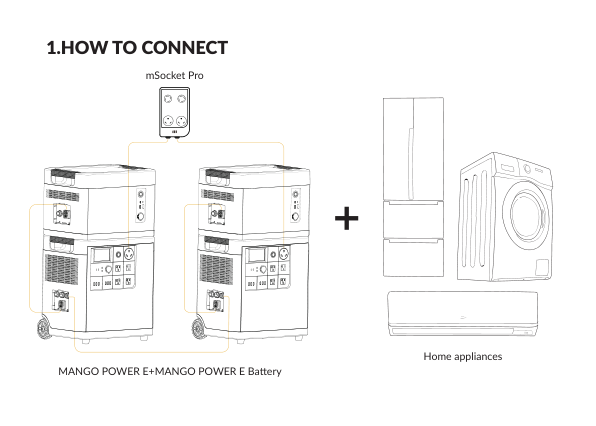
- Stack each Mango Power E Battery on its Mango Power E and connect them with the E+ cable.
- Link the two E units with the E-Link communication cable (included).
- Plug mSocket Pro into the 30 A AC outlet of each E unit.
- Disconnect AC charging cables on both E units before plugging into mSocket Pro.
- Turn the units on and tap AC on one E touch screen. Home appliances connect to mSocket Pro.
Specifications
Section titled “Specifications”| Item | Value |
|---|---|
| Output voltage | 120 V / 240 V |
| Output current | Max 30 A |